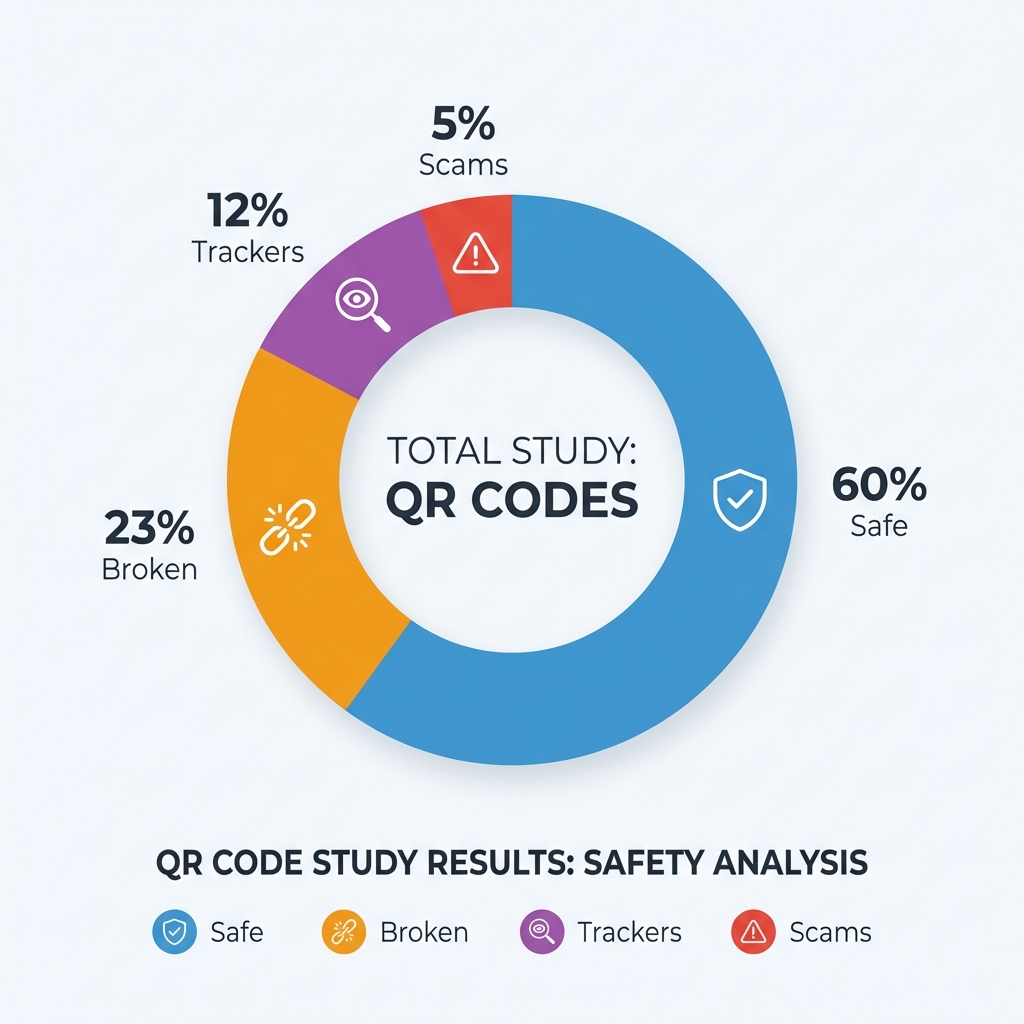
The QR Code Risk Landscape in 2026
QR codes are everywhere in 2026. We use them to pay for parking, view menus, pick up packages, and connect to public WiFi. Their convenience makes them a target for criminals.
Security researchers and consumer protection agencies have consistently documented patterns in how QR code fraud works. Based on reported cases and cybersecurity findings, this is what the QR code threat landscape looks like today.
How Common Are Fake QR Codes?
The FBI and FTC have both issued public warnings about QR code fraud. Reported QR scams have increased each year since 2021. Cities including San Francisco, Austin, and London have publicly announced the removal of fake QR stickers from parking meters and public infrastructure.
Security research consistently points to three main categories of QR code risk in public spaces:
- Sticker Overlays: Fake codes physically placed over legitimate ones in high-traffic areas.
- Expired or Broken Codes: Legitimate codes left in place after the underlying link or service was shut down.
- Aggressive Data Collection: Codes that demand unnecessary location permissions or account login to view a simple menu or schedule.
The Most Documented Attack: The Sticker Overlay
Law enforcement reports consistently identify the sticker overlay as the most common physical QR code attack. The pattern is always the same: a criminal prints a convincing fake QR code sticker and pastes it over a legitimate one in a location where people expect to scan something.
Confirmed real-world locations from published reports include:
- Parking meters and pay stations: The highest-risk category. Multiple US cities have discovered fake payment QR stickers on parking machines. The code looks identical to the official one but redirects to a site that steals credit card details.
- Bike and scooter share stations: Fake unlock codes have been found in several cities, directing users to pay a deposit on a fraudulent site.
- Restaurant tables and menus: Stickers placed over original QR codes that redirect to malware download pages, often disguised as a required app install.
Aggressive Tracking to Watch For
Not all problematic QR codes are scams. Some are legitimate businesses that make unreasonable data requests before letting you access basic information:
- Requiring exact GPS location before showing a restaurant menu
- Requiring an email account login to access free public WiFi
- Redirecting to an app store download when a website would do the job
If a QR code requires you to give up more information than the service warrants, close the page and report it to the staff.
How to Identify a Suspicious Code
Physical signs that a QR code may have been tampered with:
- Sticker texture: Run your finger over it. If it feels raised or layered on a smooth metal or glass surface, it may be a fake sticker placed over the original.
- Size mismatch: A fake sticker is often slightly smaller or larger than the outlined space on an official sign.
- Looks newer than surroundings: If the QR code sticker looks freshly printed while the rest of the sign shows wear, that is a warning sign.
The 3-Second Safety Check
Before scanning any code in a public space, take 3 seconds:
- Feel it: Is it a sticker on top of another surface?
- Read it: Check the URL preview before tapping the link.
- Question it: Does it ask you to log in, download an app, or pay through an unfamiliar site?
If you answer yes to any of these, do not proceed. Use the official app or website instead.